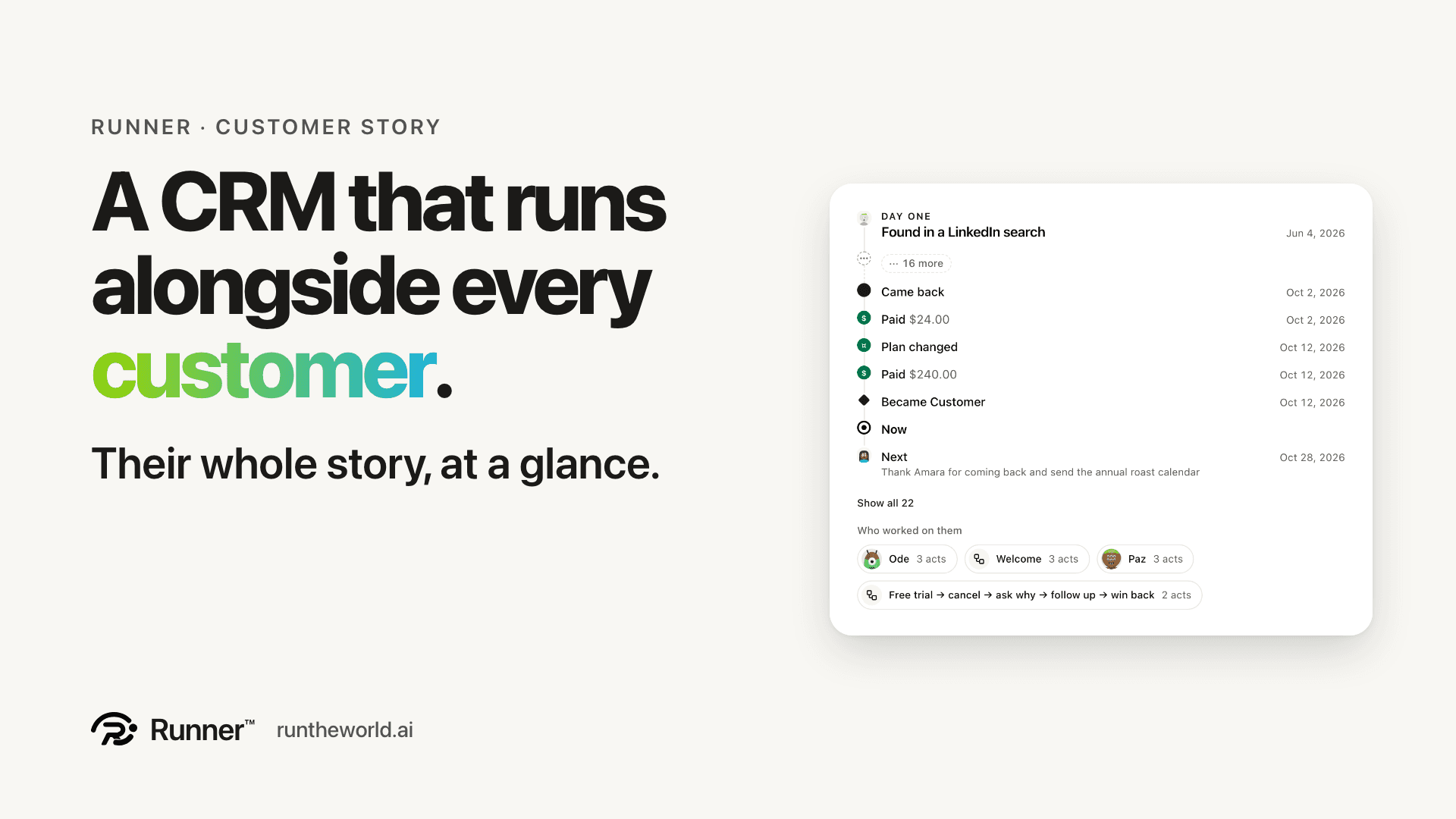
Ask an owner about a good customer and you get a story. We found them in a LinkedIn search and wrote three times before they replied. A call, then a meeting. They took the trial and paid monthly, then cancelled because it cost too much. A few weeks later they came back, on the annual plan. That story is the most useful thing you know about a customer, and most software scatters it across an inbox, a billing page and somebody's memory.
In Runner it is the first thing you read. Open any customer, and under their name is Their story: the path, who worked on them, and where they stand.
The path
One line, oldest to newest, each stop a word and a date: Found in a LinkedIn search. Emailed, 3 times. Replied. Called. Met. Trial started. Paid. Cancelled. Answered. Came back. Plan changed. Then Now, and after it Next: what happens next. A change of stage is a stop too, like Became Customer, so a long relationship makes a long path. The band shows the latest 8 stops, and Show all 22 opens the rest. Every stop comes from something Runner already keeps, the email that went out, the call that was made, the charge that went through, so nothing on the path is a guess.
Tap any stop and it opens beside the path: the email with the campaign or journey that sent it and whether it was opened, the call with who made it and how it went, the answers they gave, the charge with its invoice, a cancellation with what it took off the monthly revenue, a change of stage with who made it and why. Close it and you are back where you were. Every step, in order, is one tap further down, in Activities.
Who worked on them
Every person and every agent who worked on this customer, with their face and how many times each acted: the runner who called them, the win-back that wrote to them, and you. When an agent does something to a customer, it signs the record with its own name and the customer's, so you never have to work out afterwards whether a person or a teammate sent that email.
When an agent does something to a customer, it signs the record.
Where they stand
Three facts. Stage: where they are, from Lead to Customer. Value: their plan, and the money they have actually paid, from Stripe and from your till. It is never a forecast, and until something is charged it says Nothing charged yet. Appreciation: the score they gave you when you asked, like 4 of 5. If you have never asked, it says Not asked yet, with a button to ask.
Value is money they have actually paid. Never a forecast.
Asking why, nicely
The best time to learn why someone left is the day they leave, and the worst way to ask is a form that looks like a tax return. Why did you cancel? is a page in your product's own accent colour, with your logo on it and big answer tiles, one tap per question. The usual eight reasons are already there, each with one of the app's icons, and you can change the words and the tiles. Whatever they answer lands on their story. The box that says You may contact me about this is never ticked for them, and the follow-up writes only to people who ticked it.
The win-back writes the rest
Free trial → cancel → ask why → follow up → win back is a starter you can switch on. Someone cancels, and Runner sends them Why did you cancel?. Two days later it follows up on the reason they gave: price gets your save offer, a missing feature gets the email about what is coming, and anything else goes to a person on your team. Thirty days on, the win-back email. If they come back, the journey ends there, and their path says Came back, and Plan changed if they moved to annual. The journey's page keeps the score in one line: how many came back, how many did not, and how many are still in the flow.
The save offer arrives after they have cancelled, never in the way of it.
People like this
A good story is worth repeating. On any customer, People like this turns their path into an audience, like Came back after cancelling. The audience is a real list your campaigns and journeys can use.
There is nothing to fill in. The story is built from what your team, your agents and your customers already did, and it reads the same wherever a customer appears: on their record, in the quick look from your contact list, and on the people of an account.
If there is a stop you would want on the path, tell us.
Give your business a growth team.
Create your account and pick a plan. Your team is built once the plan is paid.