You ship a change to your shop's code, and customers never hear about it. The code moved, the README moved, and the people who buy from you carry on as before. A deploy that nobody mentions is a small chance lost to say something useful.
If you run the shop and do not read code, you usually find out later, by chance, from whoever pushed the change. Routine updates are quieter still. GitHub prepares them, and they can sit there waiting for someone to look, while the person who reads the morning queue has no idea they are there.
A moved branch becomes one card
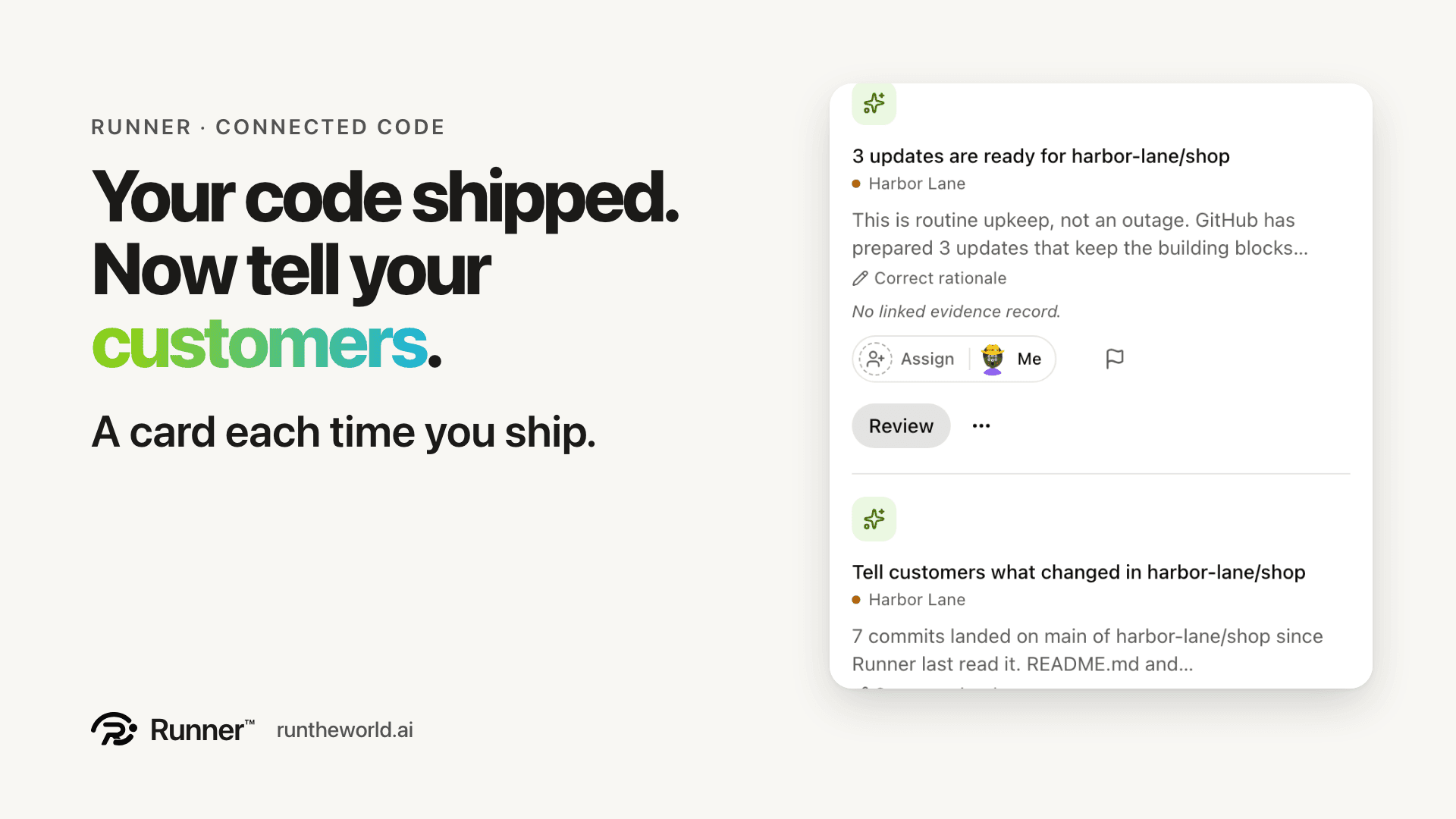
Your repository is already connected. Runner reads the branch your live shop runs from, main by default. When that branch moves, My Day gets one card: Tell customers what changed in your repository. It shows how many commits landed and which top-level documents moved with them.
Here is the demo example, a coffee roaster called Harbor Lane with a small web shop. The card says 7 commits landed on main since Runner last read it, and that README.md and docs/subscriptions.md changed with them, so what the product says about itself moved too. Runner keeps a count and file paths. That is all it keeps.
If you accept the card, it is marked as yours to tell. The next step, Draft the announcement, opens Content Studio with the title and the goal already filled in. Nothing is posted until a person approves the draft.
No commit message leaves GitHub. Runner never quotes what an engineer wrote to colleagues, and it never sends a commit message to a model. The announcement is drafted from the product's own README and docs.
One line for the updates GitHub has ready
Every hour, Runner also counts the updates GitHub has prepared for the repository. When there are some, it shows one line, such as 3 updates are ready for harbor-lane/shop, says plainly that this is routine upkeep and not an outage, and links to GitHub's own page. The repositories page in Settings carries the same count as a plain fact, beside the branch and the last commit read.
Runner fixes none of them. Pass the line to whoever looks after your code; they apply the updates in GitHub, usually in minutes. The line goes away on its own once they are in, and it never names a package. When there is nothing to show, there is no line at all, and that absence is the all-clear. One line, one link. Nothing else to keep in sync.
Where you see both
Both cards live in My Day, the queue every operator reads first. In the demo they sit between a meeting and two handovers, each with a Review button. They are low-ranked advisories, never the Up next item, so they do not crowd out the rest of your day.
On a phone it is the same two lines, each with its first sentence and a Review button. You can read them wherever you read your morning queue.
Open the updates card and it says, in plain words, what it is and what to do: routine upkeep, not an outage; pass it to whoever looks after your code; Runner clears the line once the updates are in. Members of the product see both cards, and accepting is recorded in Decided like any other recommendation.
What Runner leaves alone, on purpose
Runner is not an on-call engineer. It does no bug detection, no incident triage and no dependency advice, and it never reads your source code for defects. The people who act on those things already have their own tools. Runner tells you what shipped and what GitHub has ready for your code. It is built for the owner or manager who does not read code and does not want a second bug tracker.
Runner tells you what shipped and what GitHub has ready for your code.
Honest limits
Counting the updates needs your GitHub installation to let Runner see them, one read-only permission. Until it does, the repositories page offers the permission page instead, and My Day says nothing.
The release card counts commits and names documents. It does not summarise the code change. A repository whose head does not move produces no release card.
The one thing to do
Connect your repository and let the next deploy be a reason to talk to your customers. You can sign up and pay for Runner yourself, with no sales call needed.
Give your business a growth team.
Create your account and pick a plan. Your team is built once the plan is paid.